In order to demonstrate what you can achieve with Quarto,
and provide a cute demonstration of how to use the Julia display stack,
I want to make a tiny demo getting Julia to output some SVGs by writing TikZ code.
Using Julia to template TikZ code is how I make most of my graphics.
Even though I prefer Typst to LaTeX these days, I still find TikZ
to be more capable than the alternatives for Typst in many regards
— probably a skill issue.
The Julia Display Stack
Simply put, packages can register ways of dealing with content of different MIME types.
For example, Quarto registers ways of dealing with images, text, HTML, and so on,
and interpolates the values into the document it produces.
For the sake of demonstration, let’s display a hardcoded figure:
 1
 2
 3
 4
 5
 6
 7
 8
 9
10
11
12
13
functionBase.show(io::IO,::MIME"image/svg+xml",d::Diagram)logo=raw"""
<?xml version="1.0" encoding="UTF-8"?>
<svg xmlns="http://www.w3.org/2000/svg" xmlns:xlink="http://www.w3.org/1999/xlink" width="320" height="230" viewBox="0 0 320 230">
<path fill-rule="nonzero" fill="rgb(0%, 0%, 0%)" fill-opacity="1" d="M 67.871094 185.8125 C 67.871094 193.347656 67.023438 199.433594 65.328125 204.066406 C 63.632812 208.703125 61.222656 212.300781 58.09375 214.863281 C 54.96875 217.425781 51.21875 219.140625 46.847656 220.007812 C 42.476562 220.871094 37.613281 221.304688 32.265625 221.304688 C 25.027344 221.304688 19.488281 220.175781 15.648438 217.914062 C 11.804688 215.652344 9.882812 212.941406 9.882812 209.773438 C 9.882812 207.136719 10.953125 204.914062 13.101562 203.105469 C 15.25 201.296875 18.132812 200.394531 21.75 200.394531 C 24.464844 200.394531 26.632812 201.128906 28.25 202.597656 C 29.871094 204.066406 31.210938 205.519531 32.265625 206.949219 C 33.46875 208.53125 34.488281 209.585938 35.316406 210.113281 C 36.144531 210.640625 36.898438 210.90625 37.578125 210.90625 C 39.007812 210.90625 40.101562 210.058594 40.855469 208.363281 C 41.609375 206.667969 41.984375 203.371094 41.984375 198.472656 L 41.984375 105.550781 L 67.871094 98.429688 Z M 104.738281 100.914062 L 104.738281 160.714844 C 104.738281 162.375 105.058594 163.9375 105.699219 165.40625 C 106.339844 166.875 107.226562 168.140625 108.355469 169.195312 C 109.488281 170.25 110.804688 171.097656 112.3125 171.738281 C 113.820312 172.378906 115.441406 172.699219 117.175781 172.699219 C 119.132812 172.699219 121.359375 171.601562 124.070312 169.703125 C 128.363281 166.695312 130.964844 164.628906 130.964844 162.183594 L 130.964844 100.914062 L 156.738281 100.914062 L 156.738281 185.8125 L 130.964844 185.8125 L 130.964844 177.898438 C 127.574219 180.761719 123.957031 183.058594 120.113281 184.792969 C 116.269531 186.527344 112.539062 187.394531 108.921875 187.394531 C 104.703125 187.394531 100.78125 186.695312 97.164062 185.300781 C 93.546875 183.90625 90.382812 182.003906 87.671875 179.59375 C 84.957031 177.183594 82.828125 174.355469 81.28125 171.113281 C 79.738281 167.875 78.964844 164.40625 78.964844 160.714844 L 78.964844 100.914062 Z M 192.882812 185.8125 L 167.222656 185.8125 L 167.222656 66.777344 L 192.882812 59.65625 Z M 203.601562 105.550781 L 229.375 98.429688 L 229.375 185.8125 L 203.601562 185.8125 Z M 283.226562 141.949219 C 280.738281 143.007812 278.230469 144.230469 275.707031 145.625 C 273.183594 147.019531 270.882812 148.546875 268.8125 150.203125 C 266.738281 151.859375 265.0625 153.632812 263.78125 155.515625 C 262.5 157.398438 261.859375 159.359375 261.859375 161.394531 C 261.859375 162.976562 262.066406 164.503906 262.480469 165.972656 C 262.894531 167.441406 263.480469 168.703125 264.234375 169.757812 C 264.988281 170.8125 265.816406 171.660156 266.722656 172.300781 C 267.625 172.941406 268.605469 173.261719 269.660156 173.261719 C 271.769531 173.261719 273.898438 172.621094 276.046875 171.339844 C 278.195312 170.058594 280.585938 168.441406 283.226562 166.480469 Z M 309.109375 185.8125 L 283.226562 185.8125 L 283.226562 179.027344 C 281.792969 180.234375 280.398438 181.347656 279.042969 182.363281 C 277.6875 183.378906 276.160156 184.265625 274.464844 185.019531 C 272.769531 185.773438 270.867188 186.355469 268.753906 186.773438 C 266.644531 187.1875 264.15625 187.394531 261.296875 187.394531 C 257.375 187.394531 253.851562 186.828125 250.726562 185.699219 C 247.597656 184.566406 244.941406 183.023438 242.757812 181.0625 C 240.570312 179.105469 238.894531 176.785156 237.726562 174.109375 C 236.558594 171.4375 235.972656 168.515625 235.972656 165.351562 C 235.972656 162.109375 236.59375 159.171875 237.839844 156.53125 C 239.082031 153.894531 240.777344 151.523438 242.925781 149.410156 C 245.074219 147.300781 247.578125 145.417969 250.441406 143.757812 C 253.304688 142.101562 256.378906 140.574219 259.65625 139.179688 C 262.933594 137.785156 266.34375 136.507812 269.886719 135.339844 C 273.425781 134.171875 276.933594 133.058594 280.398438 132.003906 L 283.226562 131.324219 L 283.226562 122.960938 C 283.226562 117.535156 282.1875 113.691406 280.117188 111.429688 C 278.042969 109.167969 275.273438 108.039062 271.808594 108.039062 C 267.738281 108.039062 264.910156 109.019531 263.328125 110.976562 C 261.746094 112.9375 260.953125 115.308594 260.953125 118.097656 C 260.953125 119.679688 260.785156 121.226562 260.445312 122.734375 C 260.109375 124.242188 259.523438 125.558594 258.695312 126.691406 C 257.867188 127.820312 256.679688 128.726562 255.132812 129.402344 C 253.589844 130.082031 251.648438 130.421875 249.3125 130.421875 C 245.695312 130.421875 242.757812 129.382812 240.496094 127.3125 C 238.234375 125.238281 237.105469 122.621094 237.105469 119.453125 C 237.105469 116.515625 238.101562 113.785156 240.097656 111.261719 C 242.097656 108.734375 244.789062 106.566406 248.183594 104.761719 C 251.574219 102.949219 255.492188 101.519531 259.9375 100.464844 C 264.382812 99.410156 269.09375 98.882812 274.066406 98.882812 C 280.171875 98.882812 285.429688 99.429688 289.839844 100.519531 C 294.246094 101.613281 297.882812 103.175781 300.746094 105.210938 C 303.609375 107.246094 305.71875 109.695312 307.074219 112.558594 C 308.433594 115.421875 309.109375 118.628906 309.109375 122.167969 Z M 309.109375 185.8125 "/>
<path fill-rule="nonzero" fill="rgb(25.1%, 38.8%, 84.7%)" fill-opacity="1" d="M 72.953125 76.589844 C 72.953125 86.257812 65.117188 94.089844 55.453125 94.089844 C 45.789062 94.089844 37.953125 86.257812 37.953125 76.589844 C 37.953125 66.925781 45.789062 59.089844 55.453125 59.089844 C 65.117188 59.089844 72.953125 66.925781 72.953125 76.589844 Z M 72.953125 76.589844 "/>
<path fill-rule="nonzero" fill="rgb(22%, 59.6%, 14.9%)" fill-opacity="1" d="M 256.300781 40.171875 C 256.300781 49.835938 248.464844 57.671875 238.800781 57.671875 C 229.132812 57.671875 221.300781 49.835938 221.300781 40.171875 C 221.300781 30.507812 229.132812 22.671875 238.800781 22.671875 C 248.464844 22.671875 256.300781 30.507812 256.300781 40.171875 Z M 256.300781 40.171875 "/>
<path fill-rule="nonzero" fill="rgb(58.4%, 34.5%, 69.8%)" fill-opacity="1" d="M 277.320312 76.589844 C 277.320312 86.257812 269.484375 94.089844 259.820312 94.089844 C 250.15625 94.089844 242.320312 86.257812 242.320312 76.589844 C 242.320312 66.925781 250.15625 59.089844 259.820312 59.089844 C 269.484375 59.089844 277.320312 66.925781 277.320312 76.589844 Z M 277.320312 76.589844 "/>
<path fill-rule="nonzero" fill="rgb(79.6%, 23.5%, 20%)" fill-opacity="1" d="M 235.273438 76.589844 C 235.273438 86.257812 227.4375 94.089844 217.773438 94.089844 C 208.105469 94.089844 200.273438 86.257812 200.273438 76.589844 C 200.273438 66.925781 208.105469 59.089844 217.773438 59.089844 C 227.4375 59.089844 235.273438 66.925781 235.273438 76.589844 Z M 235.273438 76.589844 "/>
</svg>
"""write(io,logo)end
Simply put, when an object is displayed, Julia traverses the registered handlers
until it finds one that matches the MIME type, in this case image/svg+xml.
Since Quarto installs a handler for this MIME type,
a Diagram object now displays nicely when evaluated:
1
Diagram()
Now, we obviously don’t want to hand-write XML for our figures.
Instead, we will be using TikZ commands in a LaTeX document,
and compile that to an SVG.
Compiling LaTeX to SVG
To compile TikZ commands, we will simply write a LaTeX file
to a temporary directory, compile it, and read it.
This gives us the SVG code as a Julia string.
Ugly and effective :-)
In order to compile, the LaTeX code needs to be a complete document.
That means we need a little preamble with
\documentclass{standalone} meaning the document is a standalone figure,
\usepackage{tikz} to use TikZ,
and a document block.
The TikZ commands themselves live inside the tikzpicture block.
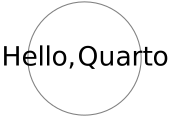
And indeed, the following successfully compiles, and we get some SVG code:
 1
 2
 3
 4
 5
 6
 7
 8
 9
10
11
12
constexample=raw"""
\documentclass{standalone}
\usepackage{tikz}
\begin{document}
\begin{tikzpicture}
\draw[gray] (0,0) circle (0.75);
\node at (0,0) {Hello, Quarto!};
\end{tikzpicture}
\end{document}
"""compilesvg(example)
The basic premise is that a Diagram contains within it the LaTeX
code that generates the diagram.
To show a Diagram, we need to render the LaTex by
compiling the content to an SVG, and write that.
To get started, let’s add a String to the type:
1
2
3
structDiagramtex::Stringend
And the show implementation needs to compile this string,
and write the result instead of a hardcoded SVG:
Testing it with the example document from the previous section:
1
Diagram(example)
And indeed, it works.
The article could be done here; you are able to render LaTeX documents
as SVGs and have them rendered in Quarto documents,
and you have all the string manipulation facilities in Julia at your
disposal to do templating.
However, it’s a little clunky.
Interpolating Julia values in some cases require pretty complicated formats
in TikZ commands,
and working with the entire document as one long string is a little inconvenient.
Making it useful
To be clear: The goal is not to abstract away TikZ.
Having the Diagram be essentially TikZ commands in a trenchcoat
is a big advantage, because a lot of the time when you want to get something
just right,
having the full flexibility of TikZ available is important.
That way, you can get in there and raw dog it to adjust the anchoring of some text,
shorten an arrow by a hair, or whatever it is you need to do to get it right.
But I don’t like doing that all the time,
so I’d like a smidge more scaffolding in place.
Separate preamble
I find it convenient to separate the preamble and TikZ commands,
and not store the whole document sequentially with \begin{document}
and \end{document} included,
because this enables rendering the figure, adding some more TikZ commands,
and rendering again.
This is useful if you are making slides, and want to gradually enrich a figure
as things are explained.
Rendering this diagram is a little more involved, but still
reasonably straight forward.
I like to have a separate function to render the Diagram into
LaTeX — incidentally, it is quite helpful for debugging when your document
suddenly doesn’t compile :-)
1
2
3
4
5
6
7
8
9
10
11
12
13
14
15
16
17
functionrender(diagram::Diagram)io=IOBuffer()# Render the preambleseekstart(diagram.preamble)write(io,read(diagram.preamble))# Render the TikZ picture in a documentwrite(io,"\\begin{document}\n")write(io,"\\begin{tikzpicture}\n")seekstart(diagram.tikzcmds)write(io,read(diagram.tikzcmds))write(io,"\\end{tikzpicture}\n")write(io,"\\end{document}\n")String(take!(io))end
The empty diagram, when rendered, produces the following LaTeX document:
Displaying a figure, then, simply consists of rendering it
to LaTeX, and compiling the resulting LaTeX document to SVG, and showing that
in the same way we have done previously. The only thing new is render as a
separate step.
This is the base upon which we will build most of the interface.
Geometric primitives
While drawing diagrams by just printing TikZ commands to the IO buffers is perfectly doable,
it gets quite tedious.
The commands are often long, the syntax is at times a bit strange,
and for some things, like specifying colors inline, the syntax is
completely asinine.
Moreover, for the same figure, you frequently end up repeating similar commands
that draw the same things with slightly different parameters.
I like to define some helper functions for drawing the geometric
primitives my figure will consist of.
I take care to make sure the helper functions accept
normal Julia types, such as colors from Colors.jl,
functiontext!(diagram,(x,y),txt;color=nothing)opts=String[]if!isnothing(color)push!(opts,"color=$(tikzcolor(color))")endoptions=join(opts,",")tikz!(diagram,"\\node[$options] at ($x, $y) {{$txt}};")end
And finally, to draw a circle, with an optional fill and draw color:
 1
 2
 3
 4
 5
 6
 7
 8
 9
10
11
functioncircle!(diagram,(x,y),radius;draw=nothing,fill=nothing)opts=String[]if!isnothing(draw)push!(opts,"draw=$(tikzcolor(draw))")endif!isnothing(fill)push!(opts,"fill=$(tikzcolor(fill))")endoptions=join(opts,",")tikz!(diagram,"\\draw[$options] ($x, $y) circle ($(radius));")end
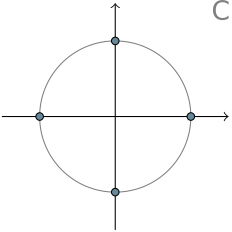
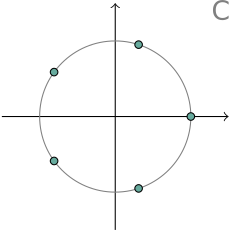
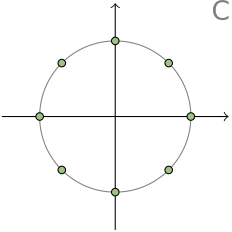
The goal is to plot the roots of unity for an integer $N$,
i. e. solutions to the equation
$$
z^N = 1
$$
Famously, these take the form
$\exp \mkern-4mu \left(2 \pi i \frac {n} {N}\right)$
for $n$ in $0, 1, \dots, N-1$,
which lie on the complex unit circle.
This is a simple picture, but just about enough for a good demonstration.
With some helper functions, the print-based API is not unlike
what we get from most plotting libraries.
The following cell contains three figures, with varying N.
Turn on code folding, write some custom CSS2, add some captions,
and I think this looks pretty god damn good in a Quarto document.
Granted, this would be pretty easy to accomplish with TikZ alone,
but it is nice to be able to do iteration and calculations in Julia, and substitute
Julia values like colors into the diagram.
Summary
Obviously, we have just scratched the surface here,
but apart from defining more helper functions, I don’t think there
is much that needs to be done.
I don’t think it makes sense to try to build a Julia API that
covers everything that can be done with TikZ;
a leaky abstraction is better than a straightjacket in this case.
Would this make sense to publish as a Julia package?
I’m not so sure — it feels a bit trivial to make a package just for
shelling out to the host LaTeX compiler and connecting it to the display stack.
I have been using a variation of this system as a locally installed package,
and I think that’s a nice sweetspot:
You can gradually accumulate a library of helper functions tailored to
how you like to use TikZ.
All in all, I’m quite pleased with how well something so relatively
simple can work, and how nicely it integrates with Quarto, granted it was
not entirely without effort on the CSS side :-)